

For dog breeders

Every heat, breeding, litter, and weigh-in in one place.

Pedigree helps dog breeders keep every important breeding record, date, litter detail, and care task organized in one place, with less typing. It’s built for your phone and works on your computer too.

  • Free for up to 2 active dogs. No card needed to start.
  • Nothing to download from an app store: open it in your browser and add it to your home screen.
  • AI drafts, you decide: nothing is saved until you confirm.
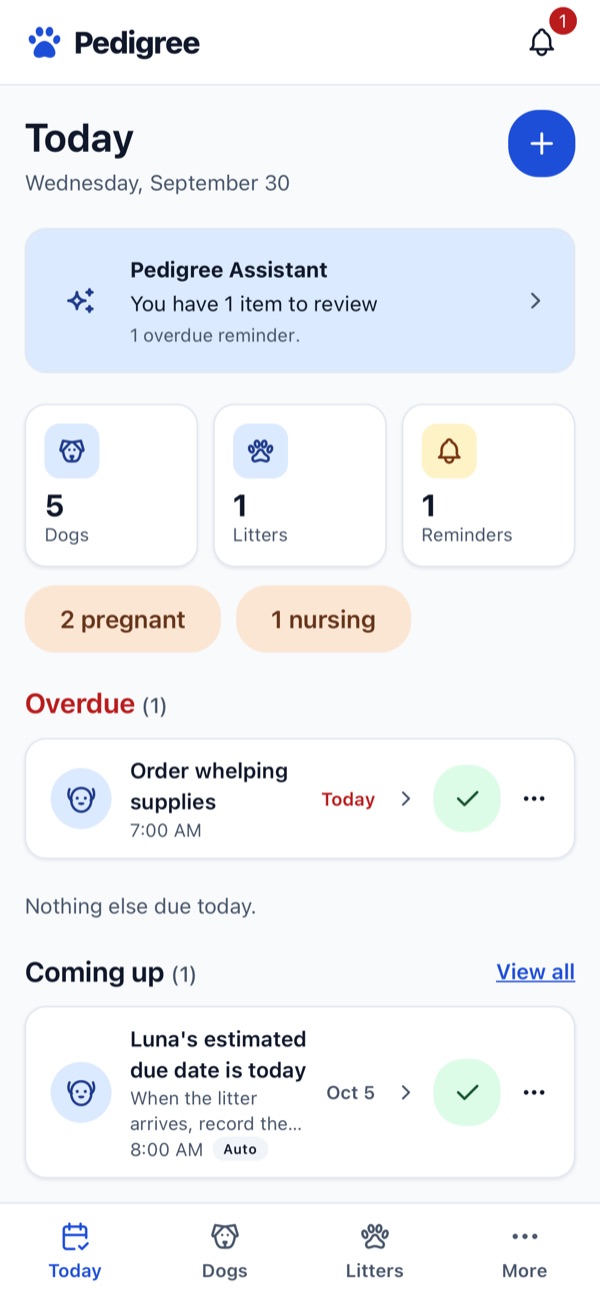
The Pedigree Today screen: counts of dogs, litters, and reminders, 2 pregnant and 1 nursing, an overdue reminder to order whelping supplies, and an upcoming reminder for Luna's estimated due date.

Demo dogs shown are AI-generated.

Features

Follow each dog through the whole breeding program

Records stay connected from one step to the next, so the heat, the breeding, the pregnancy, and the litter all live on the same dog.

  1. Dog
  2. Heat cycle
  3. Breedings
  4. Pregnancy
  5. Litter
  6. Puppies

Dogs and records

  • A profile for each dog with a photo, breed, date of birth, registration number, microchip, and adult weight.
  • Sire and dam, so each dog’s parents are a tap away.
  • Health records (vaccinations, test results, exams, medications, procedures) and documents such as registrations and vet reports.
  • Clear statuses like Available, Pregnant, Nursing, and Retired.
Heat cycles

  • Start a heat and see which day of the cycle she’s on.
  • Log observations and notes as the cycle goes.
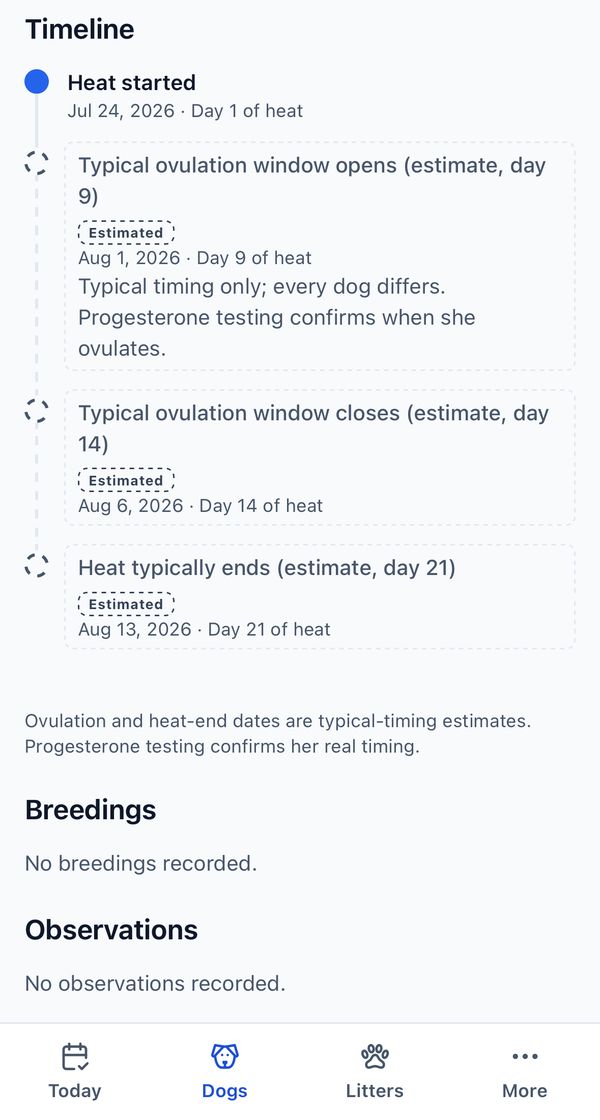
  • A timeline with typical ovulation-window and heat-end dates, each marked Estimated. Every dog differs; progesterone testing confirms her real timing.

Breedings and pregnancy

  • Record one or more breedings per cycle, with the sire, date, method, and notes. Outside studs can be added too.
  • Confirm a pregnancy and attach the scan or vet report.
  • An estimated due date from the first breeding, or enter the date your vet gave you.
  • Note how many puppies the ultrasound or x-ray showed.

Litters and puppies

  • Create the litter and add each puppy, with its own page and photo.
  • Weigh the whole litter on one screen, every day, in your kennel’s unit (grams, kilograms, ounces, or pounds).
  • Each puppy keeps its weight history, health records, and care notes.
  • Keeping a puppy? Turn it into a dog in your kennel, with its growth history kept.

Today and reminders

  • The Today screen shows what’s overdue, due today, and coming up, plus how many dogs are pregnant or nursing.
  • Add your own reminders, or let Pedigree add some for you, such as an estimated due date.
  • Push notifications on your phone when a reminder is due.

AI Smart Add Pro

  • Upload a PDF or snap a photo of a vet record or test certificate, or paste the text.
  • Say each puppy’s weight out loud instead of typing it.
  • AI drafts the records; you review, edit, and confirm before anything is saved.

How Smart Add works

AI Smart Add

Less typing. You still have the final say.

Smart Add turns the paperwork you already have into draft records. It drafts; you decide what gets saved.

  1. Add what you have

    Choose the dog, then upload a PDF or photo of a vet record or test certificate, take a picture with your phone, or paste the text.

  2. AI drafts the records

    Pedigree reads it and drafts health records, such as a test result with its date, clinic, and outcome, and shows how confident it is in each one.

  3. You review and confirm

    Check each draft against the original document, edit anything, leave out what you don’t want, then save. Discard it and nothing is saved.

Voice weights for the whole litter

On weigh-in day, say each puppy’s weight out loud (or type it). Pedigree matches the weights to the puppies and shows you the list to fix before anything is saved.

Records you can trace

Saved records are marked as AI imports, and the uploaded files stay in the dog’s Documents so you can always go back to the source.

What AI doesn’t do: Smart Add only reads and organizes information you give it. It doesn’t diagnose health conditions, give veterinary advice, or decide when or what to breed. Talk to your vet about your dogs’ health.

A look inside

Made for one hand, in the whelping room

Big buttons, clear statuses, and the next thing to do at the top of the screen.

  • Today screen with kennel counts, an overdue reminder, and a reminder for an estimated due date.
    TodayWhat needs your attention now.
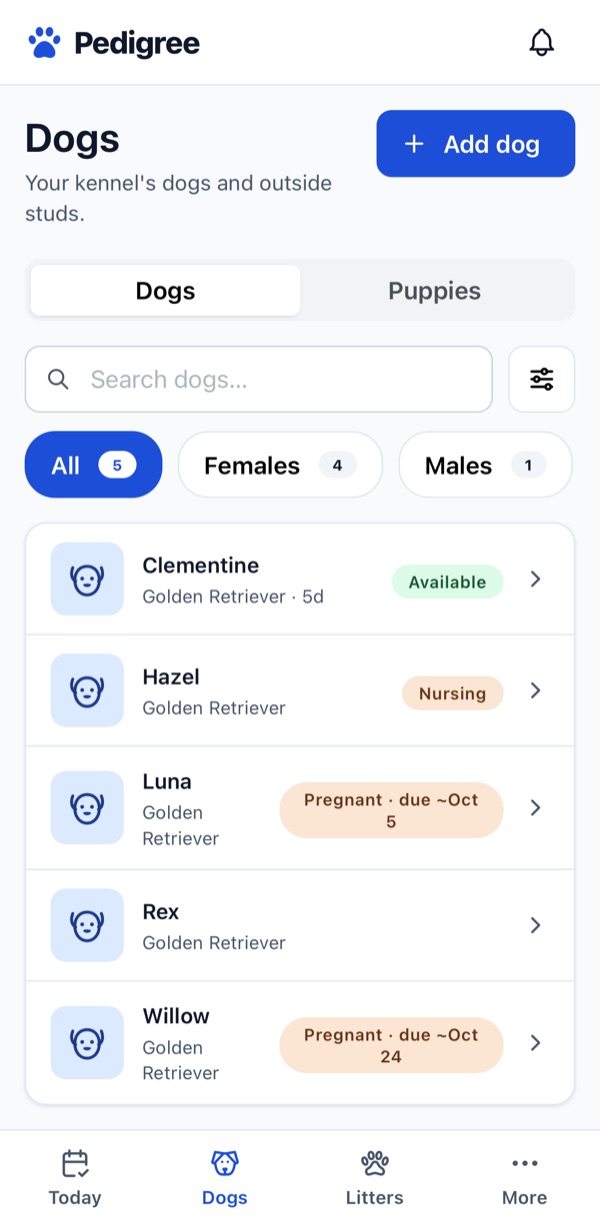
  • Dogs list showing five Golden Retrievers with statuses: Available, Nursing, and Pregnant with an approximate due date.
    Your dogsStatus at a glance, including approximate due dates.
  • Heat cycle timeline: heat started on day 1, then the typical ovulation window and heat end, each labelled Estimated, with a note that progesterone testing confirms real timing.
    Heat cycleTypical timing, clearly labelled as estimates.
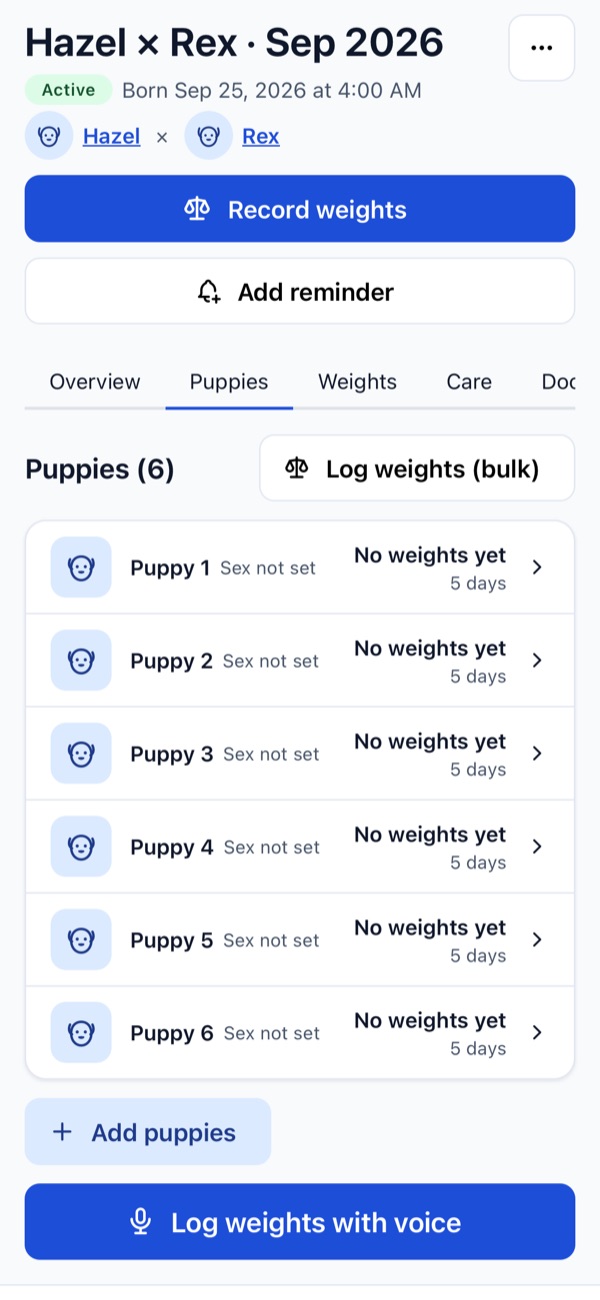
  • A litter of six puppies with buttons to record weights, log weights in bulk, and log weights with voice.
    LitterWeigh the whole litter on one screen, or by voice.
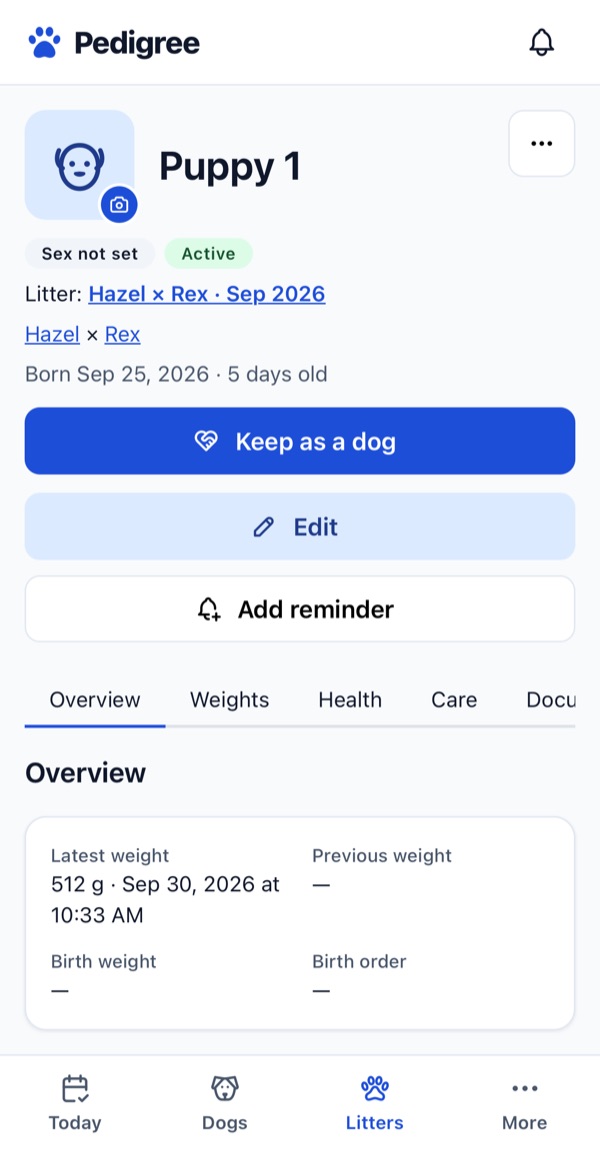
  • A puppy page showing its litter, parents, age, latest weight, and a Keep as a dog button.
    PuppyWeights, health, and care, and keep it as a dog.
Plans

Start free. Upgrade when your program grows.

Every plan includes the full breeding workflow. Pro removes the dog limit and adds the AI tools.

Free

$0. No card needed.

  • Up to 2 active dogsRetired and archived dogs, outside studs, and puppies in a litter don’t count.
  • Dog profiles, health records, and documents
  • Heat cycles, breedings, and pregnancies
  • Litters, puppies, and daily weigh-ins
  • Today, reminders, and push notifications
Get started free

Upgrade from More → Plan and billing in the app, where current Pro prices are shown. Payments are handled by Stripe. If you go back to Free, your records are kept.

FAQ

Questions breeders ask

Do I need to download an app?

No. Pedigree runs in your web browser on your phone, tablet, or computer. On your phone you can add it to your home screen so it opens like an app. On iPhone, add it to your home screen first to turn on notifications.

What does the Free plan include?

Everything except the AI tools, for up to 2 active dogs. Retired and archived dogs, outside studs, and puppies still in a litter don’t count toward that limit, so retiring a dog frees a slot.

How much is Pro?

Pro is billed monthly or yearly. Current prices are shown in the app under More → Plan and billing before you check out.

What happens to my records if I stop paying for Pro?

They stay. Going back to Free never deletes records; you just can’t add new active dogs beyond the Free limit until you retire or archive some, or upgrade again.

Are the heat and due dates exact?

No, and Pedigree says so. Ovulation-window and heat-end dates are typical-timing estimates, and due dates are estimated from the first breeding unless you enter the date your vet gave you. Every dog differs; progesterone testing and your vet confirm the real timing.

Does the AI save anything on its own?

No. Smart Add and voice weights only draft records. You review, edit, and confirm them first; if you discard a draft, nothing is saved. Smart Add doesn’t give medical or veterinary advice.

Can I use pounds and ounces?

Yes. Choose grams, kilograms, ounces, or pounds for your kennel, and weights are shown in that unit.

Can I look around before signing up?

Yes. Try the demo to explore a sample kennel.

Put your breeding records in one place

Free for up to 2 active dogs. Upgrade when you need more.